Pensieve:让 AI Agent 拥有持续生长的项目记忆
Pensieve 是一个自增长的 AI Agent 项目知识库技能,运行在 AI 工具的 Skill 系统之上,兼具最少上下文使用量和全工具兼容性。它将传统的静态 CLAUDE.md 升级为四层结构化知识体系,让每一次对话都比上一次更精准。
一、核心问题:为什么需要 Pensieve?
1.1 传统静态文档的三大痛点
| 痛点 | 表现 | 后果 |
|---|---|---|
| 维护负担 | 每换一个会话就要重新解释项目规范 | 重复劳动,浪费时间 |
| 上下文爆炸 | 将整个 CLAUDE.md 全文注入每次调用 | Token 消耗高、延迟增加 |
| 知识断层 | 三周前的决策理由、架构边界全部丢失 | 重复踩坑、决策反复 |
| 更新滞后 | 人工撰写、人工更新,容易遗忘 | 标准随心情变化,代码审查质量不稳定 |
1.2 Pensieve 的解决思路
不是存储文档,而是让每一次开发对话自动积累经验。
Pensieve 的核心理念来自一个观察:日常开发本身就是知识的来源——Commit 时有架构决策、Review 时有代码品味、Debug 时有根因分析。这些经验如果能被自动捕获并写入知识库,AI Agent 就能像经验丰富的开发者一样「开箱即知」,而不是每次都从零开始探索。
开发 → Commit → Review(pipeline)
         ↓
    自动积累经验
         ↓
  maxim / decision / knowledge / pipeline
1.3 核心价值对比
| CLAUDE.md / agents.md | Pensieve | |
|---|---|---|
| 形态 | 单个静态文件 | 四层结构化知识体系 |
| 维护方式 | 手动撰写、手动更新 | 自动积累、自动对齐 |
| 范围 | 项目约定 | 约定 + 决策 + 事实 + 工作流 |
| 关联方式 | 扁平 | 语义链接形成知识图谱 |
| 上下文消耗 | 全量注入 | 按需路由,最小消耗 |
二、四层知识模型:MUST / WANT / HOW / IS
Pensieve 将项目知识划分为四个语义层级,每层回答一个不同的问题。层级之间通过语义链接([[...]])相互关联,形成知识图谱。
2.1 四层语义对照
┌─────────────────────────────────────────────────────────┐
│                     Pensieve 知识体系                    │
├──────────┬────────────┬─────────────────────┬───────────┤
│ 语义层级 │  知识类型  │      回答的问题      │ 跨项目?  │
├──────────┼────────────┼─────────────────────┼───────────┤
│ MUST     │ maxim      │ 什么绝对不能违反?   │  ✅ 是    │
│ WANT     │ decision   │ 为什么选这个方案?   │  ❌ 否    │
│ HOW      │ pipeline   │ 这类任务该怎么跑?   │  视情况   │
│ IS       │ knowledge  │ 当前的客观事实是什么?│ ❌ 否    │
└──────────┴────────────┴─────────────────────┴───────────┘
2.2 MUST 层 — Maxims(工程箴言)
回答:什么规则是跨项目、跨语言都必须遵守的?
特征:
- 违反它会显著增加回归风险
- 换项目、换语言依然成立
- 一句话能说清楚
示例:
# Reduce complexity before adding branches

> When logic grows hard to read, simplify structure first
> and branch later only if necessary.

## Quote
"If you need more than 3 levels of indentation,
you're screwed anyway; fix your program."

## Guidance
- Split large functions by responsibility.
- Keep control flow shallow and explicit.
- Prefer clear naming over explanatory comments.

## Boundaries
- Small, local branches are acceptable when they improve clarity.

## Context Links
- Based on: [[knowledge/taste-review/content]]
- Related: [[maxims/prefer-pragmatic-solutions]]
工具提示:Maxims 应保持稀缺,不要把一次性偏好塞进去。
2.3 WANT 层 — Decisions(架构决策)
回答:这个项目做了哪个选择、为什么选它而不是其他方案?
特征:
- 包含明确的
Context(上下文)和Alternatives Considered(考虑过的备选方案) - 删除它会让未来的错误更容易发生
- 三个月后读它能节省大量弯路
必须包含的内容:
- Context(背景)
- Problem(问题)
- Alternatives Considered(考虑过的备选方案 + 为什么没选)
- Decision(最终决策)
- Exploration Reduction(探索减少):
- What to ask less next time(下次少问什么)
- What to look up less next time(下次少查什么)
- Invalidation condition(失效条件)
格式:decisions/{YYYY-MM-DD}-{statement}.md
# Use SQLite for local persistence

## One-line Conclusion
> Use SQLite over Redis for local persistence due to zero infrastructure overhead.

## Context Links
- Based on: [[knowledge/db-boundary-map]]
- Leads to: [[pipelines/run-when-committing]]

## Context
Our team needs a zero-config persistence layer that works in development and production without external services.

## Problem
Managing Redis adds operational overhead. SQLite provides ACID guarantees without any runtime service.

## Alternatives Considered
- Option A: Redis — requires Docker/managed service, adds deployment complexity
- Option B: PostgreSQL — overkill for single-node usage patterns

## Decision
Use SQLite via better-sqlite3, co-located with the application binary.

## Consequence
- Zero infrastructure dependencies
- File-based backup works with git
- Concurrent write performance is limited (acceptable for single-user tools)

## Exploration Reduction
- What to ask less next time: "what database should we use for this?"
- What to look up less next time: SQLite setup docs
- Invalidation condition: When multi-user concurrent writes become a primary concern
2.4 HOW 层 — Pipelines(可执行工作流)
回答:这类重复性任务的标准执行步骤是什么?
创建条件(必须同时满足):
- 同类任务已经重复出现多次
- 步骤顺序不可互换
- 每个步骤都有可验证的完成标准
文件名规范:run-when-*.md(run-when-committing.md、run-when-reviewing-code.md)
示例:Commit Pipeline 结构
---
id: run-when-committing
type: pipeline
title: Commit Pipeline
status: active
created: 2026-02-28
tags: [pensieve, pipeline, commit, self-improve]
description: Mandatory commit-stage pipeline. Trigger words: commit, git commit.
---

# Commit Pipeline

Before committing, automatically extract insights from the session context + diff
and capture them, then perform atomic commits.

## Signal Judgment Rules
- Only capture insights that are reusable and evidence-backed
- Classify by semantic layers: IS->knowledge, WANT->decision, MUST->maxim

## Task Blueprint

### Task 1: Decide whether to capture
**Goal**: Quickly determine if this commit contains worth-capturing experience
**Read**: git diff --cached, current session context
**Steps**: Check for signals (bug root cause / architectural decision / new pattern / ...)
**Completion**: Clear determination with one-line rationale

### Task 2: Auto-capture
**Goal**: Extract insights, write to user data, without asking user
**Read**: self-improve.md, git diff --cached, session context
**Steps**:
1. Read spec → generate content → write to short-term/ or in-place
2. Refresh state: maintain-project-state.sh --event self-improve
**Completion**: Files written, graph refreshed

### Task 3: Atomic commits
**Goal**: Perform atomic git commits
**Steps**:
1. Cluster by reason for change
2. Each cluster = one atomic commit
3. Title < 50 chars, imperative mood, explain WHY not WHAT
**Completion**: All staged changes committed independently

## Failure Fallback
- `git diff --cached` empty → skip capture, output notice
- Capture fails → log reason, continue to Task 3, suggest doctor
关键规则:
- Body 只能包含任务编排、验证循环、失败回退
- 冗长的背景/理由必须拆分为
knowledge/decision/maxim并用[[...]]链接回来 - 必须至少有一个有效
[[...]]链接
2.5 IS 层 — Knowledge(系统事实)
回答:哪些客观事实如果不记录下来,就会反复拖慢执行?
特征:
- 必须是可验证的或可追溯的
- 是"客观事实"而非"我们决定这么做"
- 探索型 knowledge 应包含:状态转换、症状→根因→定位、边界与归属、反模式、验证信号
格式:
knowledge/{name}/
├── content.md       # 主体内容
└── source/          # 可选,原始来源
# Payment Module Boundary Map

## Source
src/payment/*.ts + internal wiki

## Summary
Payment module has three entry points and two side-effect boundaries.

## Content
### Entry Points
- `PaymentService.charge()` — async, returns transaction ID
- `PaymentService.refund()` — async, triggers reconciliation
- `PaymentService.settle()` — cron job, processes batch settlements

### State Transitions
- PENDING → PROCESSING → SETTLED
- PENDING → FAILED (retry up to 3x)
- PROCESSING → REFUND_REQUESTED → REFUNDED

### Symptom → Root Cause → Location
- "Transaction not found" → missing idempotency key → `PaymentService.charge()` missing key deduplication
- "Double charge" → race condition → `settle()` lacks row-level lock

### Boundaries
- Payment module NEVER calls NotificationService directly
- All side effects go through `PaymentEventBus`
三、知识图谱:让四层知识互联
层级之间通过三种语义链接相互关联:
| 链接类型 | 起点约束 | 终点约束 | 说明 |
|---|---|---|---|
| Based on | 任意层 | knowledge / decision | 依赖的前置知识或决策 |
| Leads to | 任意层 | pipeline / decision | 导致的流程或后续决策 |
| Related | 任意层 | 任意层 | 并行相关主题 |
3.1 图谱生成机制
generate-user-data-graph.sh 脚本扫描整个 .pensieve/ 目录,解析所有 [[...]] 链接,生成 Mermaid 格式的知识图谱:
实际产出的知识图谱示例(来自 Pensieve 官方项目):
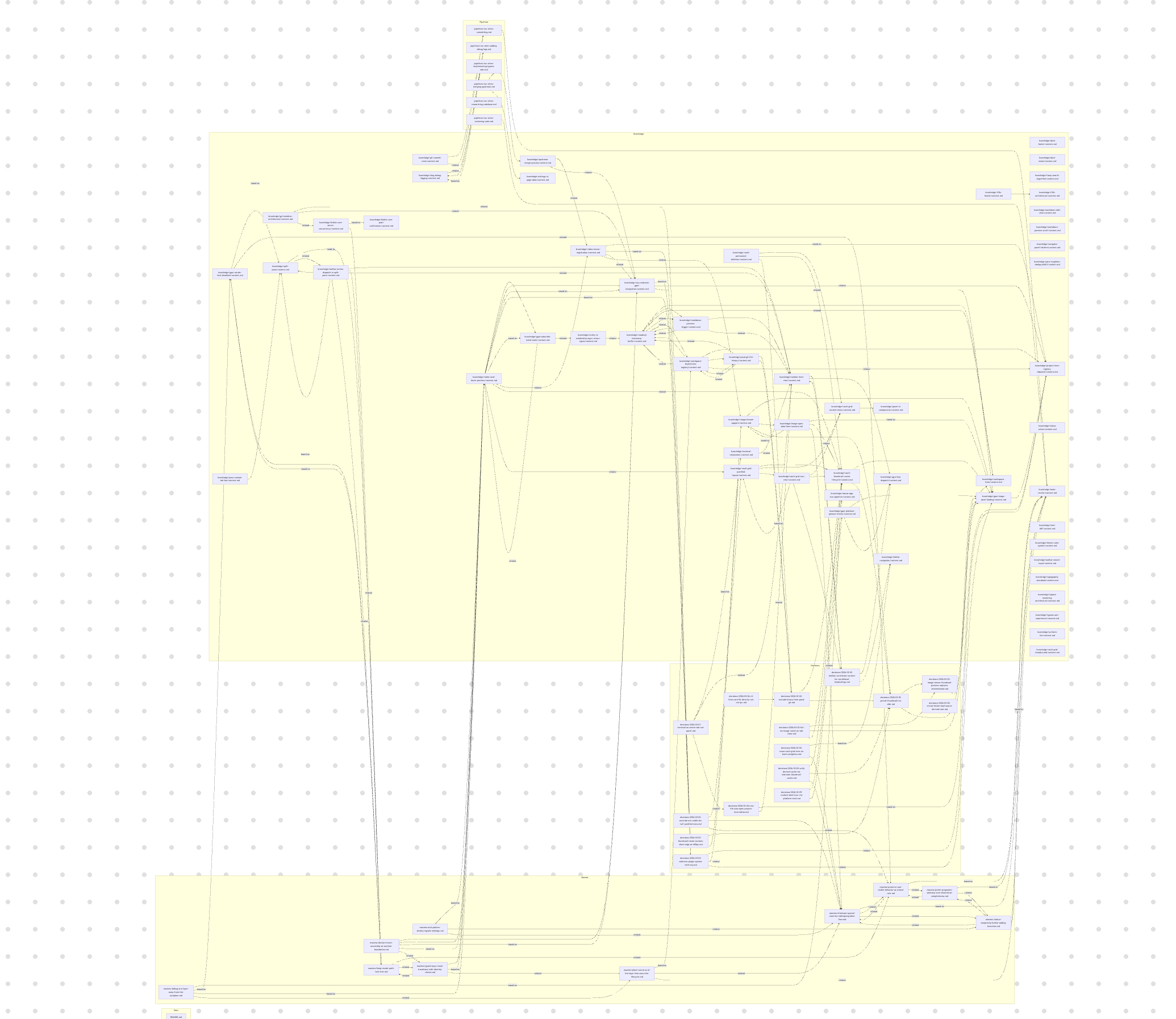
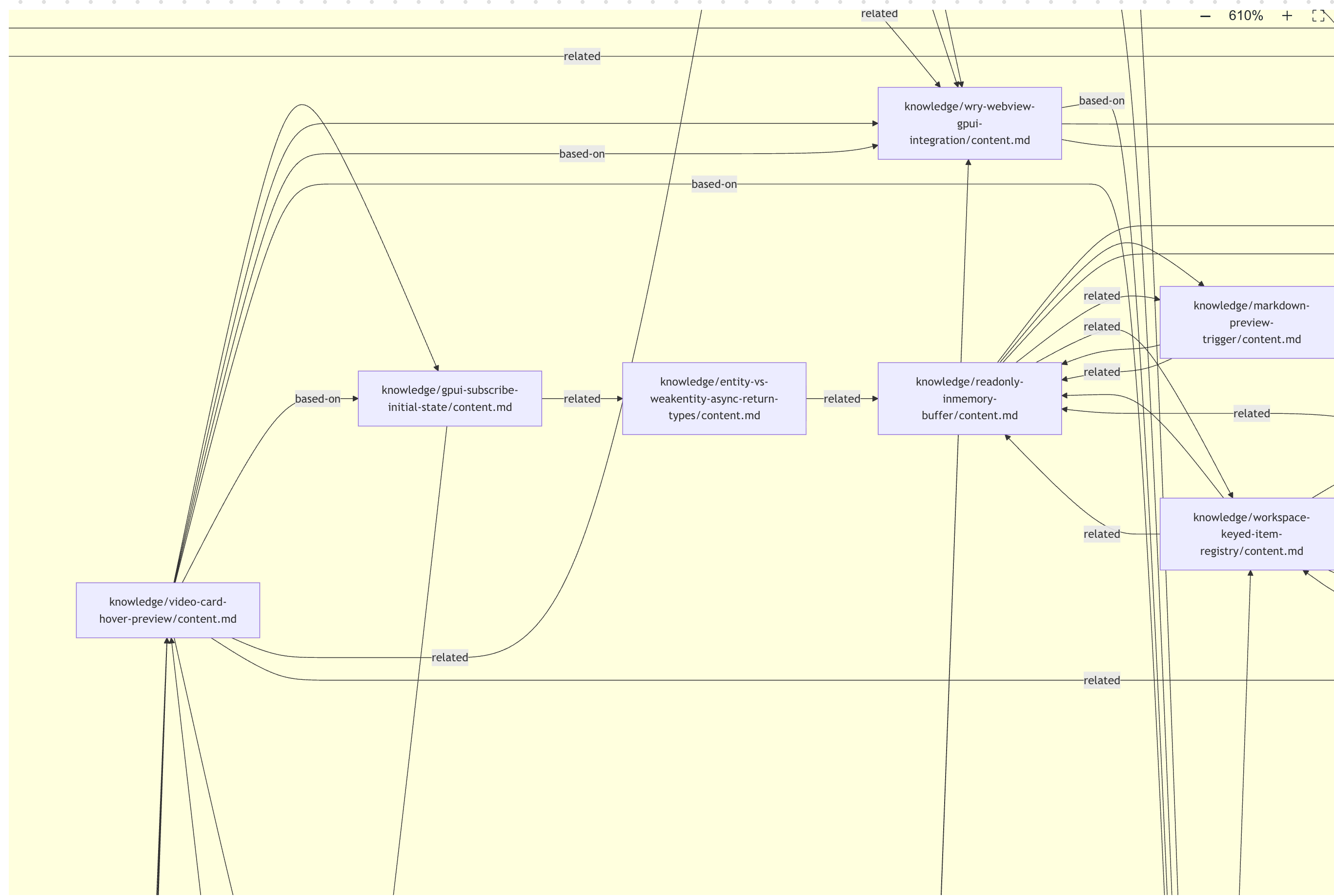
3.2 链接解析规则
规则一:short-term 中的链接不加 short-term/ 前缀
        ✅ [[decisions/2026-03-16-foo]]
        ❌ [[short-term/decisions/2026-03-16-foo]]

规则二:promote(从 short-term 移动到 long-term)时无需更新任何引用
        图谱解析器在处理 short-term 时会去掉前缀,与 long-term 共享节点 ID

规则三:decision 和 pipeline 必须至少有一个 [[...]] 链接
        否则 doctor 会报告 MUST_FIX
四、七大工具:知识循环的驱动引擎
┌────────────────────────────────────────────────────────┐
│              Pensieve 七大工具                           │
├──────────┬──────────────────────────────────────────────┤
│ init     │ 初始化项目数据目录 + 填充种子文件              │
│ upgrade  │ 刷新全局技能源码                               │
│ migrate  │ 迁移旧版数据 + 清理废弃结构                    │
│ doctor   │ 只读扫描:检查 frontmatter/链接/目录结构       │
│ self-improve │ 从对话/diff 中提取洞察,写入 short-term     │
│ refine   │ 短时记忆分类整理 + 压缩                        │
│ sync-instructions │ 将 pipeline 短路由写入 CLAUDE.md      │
└──────────┴──────────────────────────────────────────────┘
4.1 init — 项目初始化
触发时机:首次将 Pensieve 集成到项目时
执行流程:
- 创建
<project>/.pensieve/{maxims,decisions,knowledge,pipelines,short-term}/ - 从
.src/templates/pipelines/填充默认 Pipeline(run-when-committing.md等) - 从
.src/templates/knowledge/填充默认 Knowledge(taste-review/content.md) - 生成初始
state.md和.state/目录 - 启动基线探索(扫描最近 commits 和热点文件,产出「待持久化候选」列表,但不自动写入)
- 提醒用户运行
doctor --strict进行验证
关键特性:幂等设计——已存在的目录不会被覆盖
4.2 self-improve — 自动积累洞察
触发时机:任务轮次结束且有明确可复用的结论时
写入策略:
- 新文件 → 默认写入
short-term/{type}/(staging 区域) - 修改已有文件 → 直接原地编辑,不走 short-term
- 用户明确要求 → 可跳过 short-term 直接写入 long-term
语义分类规则:
| 洞察类型 | 语义层 | 写入位置 |
|---|---|---|
| 发现了 bug 根因 | IS | knowledge/ |
| 做了架构或设计决策 | WANT | decision/ |
| 发现了跨项目通用规律 | MUST | maxim/ |
| 某类任务有标准化流程 | HOW | pipeline/ |
自动刷新:写入后自动执行 maintain-project-state.sh --event self-improve,刷新 state.md 和知识图谱
4.3 doctor — 健康检查
检查范围:
- Frontmatter:所有
maxim/decision/pipeline/knowledge文件是否有必需字段 - 链接完整性:所有
[[...]]是否有对应目标文件(broken links) - 目录结构:
maxims/decisions/knowledge/pipelines四层目录是否齐全 - 关键种子文件:
pipelines/run-when-*.md和knowledge/taste-review/content.md是否与模板一致 - Short-term TTL:
short-term/中超过 7 天的条目触发提醒 - 指令对齐:
CLAUDE.md/AGENTS.md中 Pensieve 短路由块是否正确
输出格式:
## 1) Executive Summary
- Overall status: FAIL / PASS_WITH_WARNINGS / PASS
- MUST_FIX: 3
- SHOULD_FIX: 2
- Suggested next step: `migrate`

## 2) Must Fix (by priority)
1. [GRAPH-001] Unresolved link [[decisions/2026-04-01-foo]]
   File: decisions/2026-03-01-bar.md

## 5) Action Plan
1. Run `migrate` to complete structure migration
4.4 refine — 短时记忆整理
触发时机:定期(或 doctor 提醒)处理 short-term/ 中的条目
决策:
- 保留(promote)→
mv到对应的 long-term 目录 - 删除 → 确认后删除
- 合并 → 多个相关 short-term 条目合并为一个 decision
规则:short-term/ 中的链接不需要加 short-term/ 前缀——解析器会去掉前缀,与 long-term 共享节点 ID
五、自增强循环:开发即积累
Pensieve 的核心价值不在于静态存储,而在于建立了开发活动与知识积累之间的自动化闭环:
    ┌─────────────────────────────────────────┐
    │           开发会话 / Commit / Review     │
    └──────────────────────┬──────────────────┘
                           │
              ─────────────┼─────────────
                           ▼
    ┌──────────────────────────────────────────┐
    │  Commit Pipeline(自动触发)              │
    │  1. 判断是否有值得捕获的洞察              │
    │  2. 从 diff + 对话中提取洞察               │
    │  3. 分类写入 short-term 或 in-place      │
    │  4. 刷新 state.md + 图谱                  │
    └──────────────────────┬──────────────────┘
                           │
                           ▼
              ┌────────────────────────┐
              │  .pensieve/ 知识库     │
              │  maxims/decisions/     │
              │  knowledge/pipelines/  │
              └───────────┬────────────┘
                          │
           ┌─────────────┼─────────────┐
           ▼             ▼             ▼
      MUST 层         WANT 层        HOW 层
    (跨项目规则)   (当前决策)    (工作流)
           │             │             │
           └─────────────┴─────────────┘
                          │
                          ▼
    ┌──────────────────────────────────────────┐
    │  下一次开发会话                          │
    │  AI Agent 按需加载对应层知识             │
    │  → 不再重复踩坑                          │
    │  → 不再重复探索                          │
    └──────────────────────────────────────────┘
5.1 典型使用场景
| 场景 | 操作 | 效果 |
|---|---|---|
| 验证 AI 生成的方案 | "use pensieve to check the accuracy of this plan" | 自动交叉检查 maxims 和 decisions,拦截违反架构约定的方案 |
| 定位模块入口 | "use pensieve to locate the entry point of the payment module" | 直接返回 knowledge 中已有的探索结果,无需全局搜索 |
| 分析影响范围 | "use pensieve to analyze which workflows this refactoring will affect" | 通过知识图谱的关联链追溯依赖和设计意图 |
| 提交代码 | "use pensieve conventions to commit code" | 自动先做 self-improve 捕获洞察,再执行原子提交 |
| 代码审查 | "use pensieve to review the code taste of recent commits" | 按 taste-review pipeline 执行,结论自动回流到知识库 |
六、架构设计:系统代码与用户数据的物理隔离
6.1 双根目录结构
~/.claude/skills/pensieve/          # 全局技能(单次安装,git 追踪)
├── SKILL.md                        #   静态路由文件
├── .src/                           #   系统代码(模板/脚本/规范/核心引擎)
│   ├── core/pensieve_core.py       #   核心引擎
│   ├── core/doctor_engine.py        #   检查报告生成器
│   ├── core/schema.json             #   目录/文件/生命周期定义
│   ├── scripts/                     #   20 个 bash 脚本
│   ├── templates/                   #   种子内容模板
│   ├── references/                  #   各层规范文档
│   └── tools/                       #   7 个工具规格说明
└── agents/                          #   agent/UI 元数据

<project>/.pensieve/                # 项目级用户数据(可版本控制)
├── maxims/                         #   工程箴言(long-term)
├── decisions/                       #   架构决策(long-term)
├── knowledge/                       #   系统事实(long-term)
├── pipelines/                       #   可执行工作流(long-term)
├── short-term/                      #   临时缓存(7天 TTL)
├── state.md                         #   动态状态文件
├── .gitignore                       #   只忽略 .state/
└── .state/                          #   运行时产物(doctor 报告/图谱/备份)
6.2 为什么必须物理隔离?
| 隔离原因 | 说明 |
|---|---|
git pull 更新系统代码时不会意外覆盖用户数据 | 系统代码在 ~/.claude/skills/pensieve/;用户数据在 <project>/.pensieve/ |
| 一个系统安装服务所有项目 | 各项目有独立的项目知识,互不干扰 |
| 用户数据可版本控制 | .pensieve/ 目录可以在项目 repo 中提交和共享 |
| Schema 单点定义 | schema.json 定义了所有目录名、关键文件路径、迁移路径 |
6.3 状态生命周期
EMPTY → SEEDED → DRIFTED → ALIGNED
  ↑        ↑        ↑         ↑
init失败   init成功  有must_fix  doctor通过
| 状态 | 说明 | 触发工具 |
|---|---|---|
EMPTY | .pensieve/ 根目录或必需子目录缺失 | init |
SEEDED | 根目录存在,但关键文件缺失或模板不一致 | init / migrate |
DRIFTED | 必须修复的 must_fix 问题存在 | migrate / self-improve |
ALIGNED | 所有结构检查通过,状态干净 | doctor |
七、安装与使用
7.1 Claude Code 环境
# 1. 全局安装系统代码(一次性)
git clone -b main https://github.com/kingkongshot/Pensieve.git \
  ~/.claude/skills/pensieve

# 2. 安装 hooks(推荐:自动同步知识图谱)
bash ~/.claude/skills/pensieve/.src/scripts/install-hooks.sh

# 3. 初始化项目数据
cd <your-project>
bash ~/.claude/skills/pensieve/.src/scripts/init-project-data.sh

# 4. 验证
bash ~/.claude/skills/pensieve/.src/scripts/run-doctor.sh --strict
7.2 其他 AI 工具(Cursor / 通用 Agent)
# 安装技能到对应客户端的 skill 目录
git clone -b main https://github.com/kingkongshot/Pensieve.git <client-skill-path>/pensieve

# 初始化项目
cd <your-project>
bash <client-skill-path>/pensieve/.src/scripts/init-project-data.sh
7.3 更新系统代码
# 全局更新,所有项目立即生效
cd ~/.claude/skills/pensieve && git pull --ff-only

# 验证各项目
cd <your-project>
bash ~/.claude/skills/pensieve/.src/scripts/run-doctor.sh --strict
八、核心技术实现
8.1 图谱生成(generate-user-data-graph.sh)
扫描 .pensieve/ 下所有 .md 文件,提取 [[...]] 链接,生成 Mermaid 格式图谱:
扫描所有 *.md
    ↓
解析 [[link-target]] 格式
    ↓
区分 resolved(目标存在)和 unresolved(目标缺失)
    ↓
按语义层分组,生成 Mermaid graph
    ↓
输出到 .state/pensieve-user-data-graph.md
8.2 Doctor 检查引擎(doctor_engine.py)
接收三个输入 JSON:
scan.json:目录结构和 deprecated paths 检查结果frontmatter.json:所有文件的 frontmatter 字段合规性graph.md:图谱解析结果(links resolved/unresolved 统计)
生成结构化报告,关键逻辑:
- 收集结构问题 + frontmatter 问题 + unresolved links
- 分类为 MUST_FIX / SHOULD_FIX / INFO
- 短时项 TTL 检查(created + 7 天)
- 根据 schema.json 的
next_step配置决定建议工具 - 输出 markdown 报告 + JSON 摘要
8.3 语义层分类算法(self-improve)
# 分类决策树
if is_cross_project and is_cross_language and violation_increases_regression_risk:
    → MUST 层(maxim)
elif clarifies_tradeoffs or explains_architectural_choice:
    → WANT 层(decision)
elif recurring_task and non_interchangeable_steps and verifiable_completion:
    → HOW 层(pipeline)
elif factual and verifiable and would_repeatedly_slow_execution:
    → IS 层(knowledge)
8.4 Schema 约束(schema.json)
定义了 Pensieve 的「宪法」——所有脚本和检查都围绕它运行:
required_dirs:四层目录必须存在critical_files:关键模板文件及其比较模式legacy_paths:旧版路径映射(migrate 工具用于清理)memory/start_marker + end_marker:Claude auto memory 插入位置instructions/required_fragments:CLAUDE.md/AGENTS.md中必须包含的 Pensieve 路由块
九、与 Linus Prompt 的演进关系
Pensieve 最初以「Linus Torvalds 风格引导 Prompt」闻名——用「good taste」「don't break userspace」「paranoid about simplicity」来约束 Agent 行为。
这个工程哲学依然存在于核心,但现在已不是孤立的 Prompt,而是一套可执行的原则体系:
| 类型 | 内建内容 | 效果 |
|---|---|---|
| maxim | 4 条 Linus 风格工程原则 | Agent 自动避免补丁式代码,先简化再扩展,保持现有行为 |
| pipeline | Commit + Review + Refactor 三套流程 | 每次 commit/review/refactor 都检查标准,结论自动回流到知识库 |
| knowledge | Code-taste review 标准 | 「好代码」变成可执行定义 |
尝试方式:
"Use pensieve to review the code taste of recent commits""Use pensieve to commit local changes"